Study & research
Connect papers, data folders, and reference URLs to reading, citation, and analysis steps, then return to the next session.
Keep study material and the next study togetherPick up your work on Mac
Keep your next step beside the files and links you need. Come back knowing exactly where to begin.

Presentation.key · Interview notes · Reference link
Inside BackToFlow
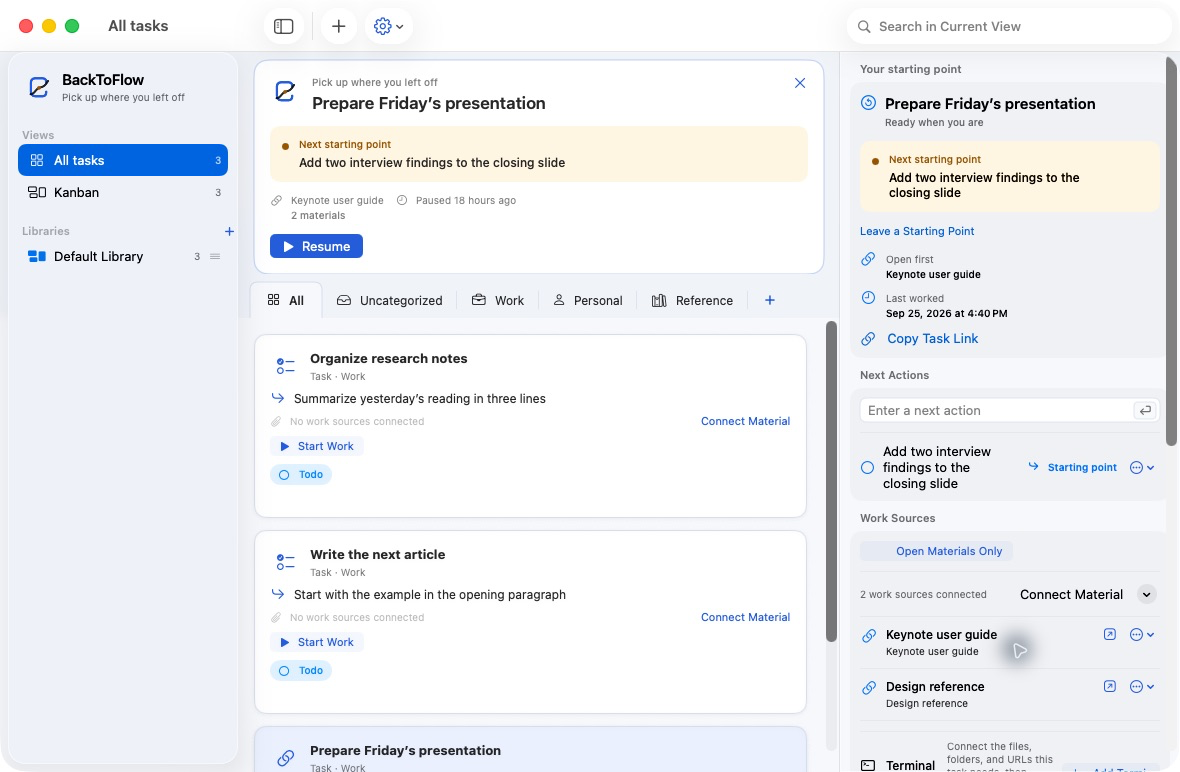
See the task to resume, your saved starting point, and the materials you need in one place.
The resume loop
Keep one thing in mind: leave the next action beside the materials you need.
Start with a task name, then connect files, folders, and links. Your materials stay where they are.
When you stop, leave one next action. You do not need to plan the whole project.
See your next action and open the materials together. Pick up the work without guessing where to start.
Made for context-heavy work
BackToFlow fits a working style, not a job title. If you switch between materials and repeatedly resume interrupted work, it is built for you.
Connect papers, data folders, and reference URLs to reading, citation, and analysis steps, then return to the next session.
Keep study material and the next study togetherConnect client folders, contracts, and drafts to review, revision, and delivery handoffs.
Return to multiple projects without huntingKeep code, design files, issue URLs, and optional Terminal requests beside the next commit, edit, or run.
Make the next build step obviousThe work layer around your materials
Organization, boards, and dates are supporting tools. The center is the task, its context, the next action, and the return.
Keep files, folders, and URLs where they belong. BackToFlow adds the task, notes, status, next action, and resume history around them.
Paste multiple steps at once. Completed actions stay in the activity history and can be reopened when needed.
Name and order shared statuses your way, then move tasks from selected libraries through the workflow.
Use Command-K Task Switcher to search tasks, material names, tags, and next actions, then preview or launch a material explicitly.
Review the last session, time spent, next action, and connected materials, then pick up the work.
Protect sensitive link data and notes with PBKDF2-derived keys, AES-GCM encryption, and automatic locking.
Export and restore the complete library, with a safety backup before restore plus retained daily and weekly backups.
Keep files, folders, and URLs together, then use Terminal requests where permitted and start recurring work from structure-only templates.
Send selected materials from Finder Services to the confirmation form. Only files, folders, and http/https addresses are accepted.
Local by design
BackToFlow does not upload materials or work history to its own server. Libraries, sessions, and next actions stay local, while secure-area metadata is encrypted separately.
Read the privacy policyBackToFlow may communicate with Apple services for App Store purchase verification and restoration.
Simple, one-time pricing
Start it yourself from the purchase screen, try every Pro feature for 14 days, then keep using existing work within the free limits.
$0
Free
Test the full task-to-context-to-resume loop with real work.
$19.99 once
or ₩29,000
A lifetime v1.x license for running more projects and resources without limits.
The 14-day Pro trial is an in-app feature trial that never starts automatically or becomes a subscription. The planned launch price is $19.99 / ₩29,000; final price and taxes follow the local Mac App Store listing. Student and education pricing can be tested after early customer validation.
Questions, answered
No. BackToFlow manages links to the files, folders, and URLs you select. Deleting a task in BackToFlow does not delete the material.
Your library information and work materials stay on your Mac. BackToFlow contains no advertising or analytics SDKs, though it may contact Apple services to verify or restore App Store purchases.
It encrypts the link data and notes registered inside the secure area with AES-GCM. It does not encrypt your work materials, and a lost secure-area password cannot be recovered.
No. Free supports up to 30 tasks and 3 categories. At the limit, you can still open, edit, delete, and back up existing tasks; only adding more is restricted.
BackToFlow is being developed for macOS 14 or later. Check the final Mac App Store listing for confirmed compatibility at launch.
No. BackToFlow Pro is planned as a one-time, non-consumable purchase that remains available throughout v1.x. The launch price is $19.99 / ₩29,000.
Version 1.0 focuses on local storage and backups you export directly. iCloud sync is not part of the current feature set.
BackToFlow is centered on resuming work. Statuses and explicit work-time sessions exist to restore a task's context alongside its sources and next action; it is not an automatic surveillance-style tracker or a team collaboration suite.
You can save Terminal launch requests on a task. BackToFlow sends them to macOS Terminal instead of executing arbitrary commands inside the app; availability depends on signing, automation permission, and App Store sandbox policy.
BackToFlow keeps the work context without moving your materials. Find launch updates and the early-user program on the support page.